Posts

Showing posts with the label web

Gui Web

Image
Tim Berners-Lee was the real inventor of the gui (www) internet. NOT I REPEAT NOT Al Gore. Source code: ------------------------------------------------------ Cern web server  Browser advanced Browser original?

Web ssh.

Image
Use this at your own risk as it is probably not safe to use. There are may web based ssh modules to use and this is just one of them. they are nice if you are operating from a tablet and do not have a desktop machine. Just fire up the html file, choose a server and then log in as you would with ssh. More info at:  http://weavervsworld.com/ssh/ssh.php  You will need several jar file and an html file to put it all together.  The files: mindterm312.jar  mindterm312.weavselfsign.jar  term.html Here is a typical html file that can be on a server or even a local machine. [code]  <html> <body>  <h4 class='heading'>Mindterm Applet Information</h4>     <p class='centererror'><b>Keep this window open after the applet has loaded.</b></p>    <object codetype='application/java-archive' classid='java:com.mindbright.application.MindTerm.class' archive='mindterm312.weavself...

Pic to html

Image
Especially if you have an embedded system that acts as a web server, you will want to display the pictures without using special software. This also perfor for sites where you can not upload anything besides html Here is a quick trick to turn a picture into a simple ascii html file which you can easily edit. Lets take the file switch.png. But we need a file in the .jpg format. No problem we can convert it with $ convert switch.png switch.jpg Still looks pretty much the same so far. Now to create the html file. $ jp2a --color --html --fill --background=light  switch.jpg --output=s.html We will use a simple web text only browser to display the html file. Now to try a regular web browser on a normal desktop system. Interesting... Of course you can add your own html. Later.

Control a program from a web page.

Image
 To the page where the web options are. Now you need to choose and option. [code]   <html> <title> Offshore Educators (Main Page) </title>  <title> lights </title>  <body bgcolor="aquamarine">     <CENTER><h2><B><I>Test PPort</I></B></h2></CENTER> Press a button to perform an action     <form ACTION="kitt.php" method="post">     <p>     <input type="submit" value="Kitt">     </form>     <p>     <form ACTION="rnd.php" method="post">     <p>     <input type="submit" value="Random">     </form>     <form ACTION="allon.php" method="post">     <p>     <input type="submit" value="All led's on">...

It's web time.

Image
Ever wonder what would be like to have a local web app for the time without having to connect to some far off unknown place with who knows what hidden features. Now you can have local clock time on your server   <code> <table border = 2 > < tr > < td > < script > var mydate=new Date() var year=mydate.getYear() if (year < 1000) year+=1900 var day=mydate.getDay() var month=mydate.getMonth() var daym=mydate.getDate() if (daym<10) daym="0"+daym var dayarray=new Array("Sunday","Monday","Tuesday","Wednesday","Thursday","Friday","Saturday") var montharray=new Array("January","February","March","April","May","June","July","August","September","October","November","December") document.write("<small><font color='000000' face=...

Another Tuxpaint hint.

Image
Using two or more programs together can make a system more powerful. In this case we want to use Tuxpaint and the Gimp.  We will start off using Tuxpaint to make a picture and then take a screen shot just of the drawing. The let's import a picture we have downloaded and use Tuxpaint to edit it and then of course to take a screen shot of that. Then we need a screen shot that was made a while back. The we need to open up the Gimp and set up a new page several times larger than the pictures and then import the three pictures. Then you can export that picture and import it into tuxpaint for final editing. So then you can use it in a web page like you blog or where ever

Traveling chef.

Image
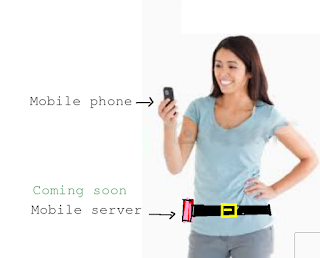
When I first made the following cartoon it was pretty much tongue in cheek. But really when you think about it, it is a blessing in disguise. What if you could localize a lot of the web you use a lot without having to use any bandwidth. Actually we already do it with our local web server now that I think about it. If you were a traveling chef you could go choose a food menu. and from that menu, you could do several things. Such as use several calculators. Such a a food conversion chart. Or even have your recipe book with you. And the neatest of all things you could have a virtual site from the same server to show your clients what they could have for dinner. Is that not all awesome! All from that little server without having to go to the internet.

Dumping Flash video.

Image
We are playing flash videos one last time to convert them to ogg vorbis type format.  We are using software like "recordmydesktop" to create new videos. Then on the server you can use code like the following: < video width =" 320 " height =" 320 " controls > < source src =" installapp.ogv " type =" video/ogg "> </ video >

Trs-80 Nostalgia.

Image
Miss the good old trs-80 III. So do I even thought about trying to find a used one but this emulator popped up and is just the ticket. You will need to create an html file that will start the whole process up. TRS-80.html [code] <!DOCTYPE html> <html> <head> <script type="text/javascript" src="trsemu-1.4.js"></script> <head> <body onload="trsEmu.screen('scrn').button('btn').perf('graph').focus();"> <div id="scrn"> <canvas width="512" height="384" style="background:black"> </canvas></div><br> <div id="graph"> <canvas width="512" height="100" style="background:black"> </canvas></div><br> <input type="button"id="btn" value="Run" onClick="trsEmu.run('toggle');"> <input type="button...

Simple web server management script.

Image
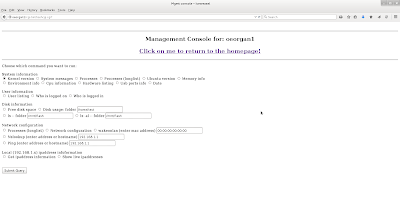
Not so long ago while  searching the web for certain cgi scripts found ths very short script in the wayback machine. Apparently the author no longer had the page, The script was twenty lines if that. The script did not seem like that much at first, but then I started adding code. You could even add other scripts to allow itself to be more powerful. The script became more and more useful. Did not fancy it up with advanced html, but it was so useful, put it on all the major servers.  An older version of the web page looks something like this: One of the features I integrated into script was to see what ipaddresses were live on the network. That may not mean so much but if you are on a tablet, that is not and easy thing to do usually. That way you could see if there were any trespassers so to speak. Pretty much know what the usual ip addresses are. If one was missing that meant a device was either down or not connected  A cute feature. If you want to experiment ...

Install once, use many.

Image
With the internet you can access so many applications say a cooking program to help you prepare meals. The network configuration is pretty simple. It might look something like this: But then you can actually set up your own home web server and the network might look something like this. I have separated the web paths from the internet and the local web server  to make things a little clearer. Now that means you could have even more interesting web applications such as a web desktop. Some with a tablet could still generate documents without having any special applications on the tablet. You even set up many other applications without having to use the web. ( http://www.instructables.com/id/Uses-for-your-own-private-cloud/ ) So now you have double the pleasure. But what if your internet was cut off or you needed to limit your bandwidth. The the network might look something like this, but you would still have access to your local server. This is sometimes kno...