Posts

Showing posts with the label eyeos

Motioneyeos.

Image
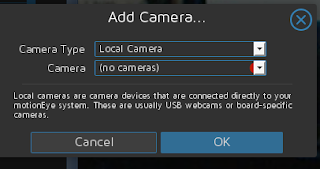
Normally I am not fond of canned software, but this one might be an exception. Motioneyeos is a raspberry pi implementation for the program Motion. Motion is software to control video capture devices. All control is done via the web. For purposes of this project we used an original raspberry pi. ( https://github.com/ccrisan/motioneyeos/releases ). There are several releases depending on the unit you have. First I tried a logitech usb camera clone. The system recognized it immediately. Not like a certain other operating system where you have to load the drivers for almost everything. Then we added an ipcamera (network ready). After adding the network camera file, it worked just like you would expect. The documentation for the camera did not have the description of the file. Fortunately the Motion software site did have that information.  ( http://www.lavrsen.dk/foswiki/bin/view/Motion/WorkingDevices ) Again no additional drivers were required. Actual picture is muc...

eyeOS is forking into Oneos.

Image
Just a bit of news again. According to the Linux Link Tech Show aka #tllts eyeOS  a gui desktop web based application  that can run from a gui-less server has been forked to Oneos.  Actually I have seen several similar sort of micro googledocs projects on Sourceforge. http://www.instructables.com/id/eyeOS/  http://oneye-project.org/

EyeOS, the web based gui.

Image
One thing I like about servers is that clients or users can run an application from a server. That means software only has to be installed and or upgraded once at a time. What a savings in support time. Places such as Sourceforge.net have many programs that can run from a web server. Three of the most common programs that people use are a spreadsheet, word processing. and a database. One such program although it was not in the package I used was a relational database. A flatfile database could be created in the spreadsheet. The program I am talking about is eyeOS. eyeOS is sort of a computer desktop for your browser.  That means the software should be platform independent.  That means you can generally use any touchpad, desktop, laptop, or anything with a browser. No per se special setup is needed in most cases on the user side. You do need a web server to host the software. A lamp, wamp, mamp, or similar type server should work. We use Apache a lot.The neat thin...

Web based OS (operating system).

Image
Handhelds are really nice, but you get away from the traditional desktop we are all familiar with.  Some people have coined the icon based tablet interfaces as being made by Fisher-Price (a toy manufacturer).  Also too, people are wanting to lower the system requirements for computers being used primarily as terminals. One way to do that is to only have the basic operating system on the machine with just the browser as a single application. How useful is that?  You can use a web server to dole out applications as I  indicated in a previous article. You now have operating systems that work from the web. You can push out desktop operating systems  based on the traditional commercial software, but that gets into to some real heavy use. That requires a lot of heavy lifting (i.e. system resources). Now people are trending towards native web based operating systems that can be doled out with just a web server. Traditional virtual machine servers become less a neces...