Posts

Showing posts with the label bsd

Command line spreadsheet.

Image
No matter what system you use or even if you do everything by hand, you will need a typewriter (editor), Filing cabinet (database), and an financial worksheet (spreadsheet). Everyone knows about vim, nano, and  for using as editor or word processor. If you have ever wanted to set up a filing cabinet or database, you probably have heard of Mysql (or one of the variants), Postgresql, or even Nosql. What many people have not heard of is a spreadsheet for the command line.One interesting spreadsheet is called simply enough called sc. Some people may lead you to believe it will only support just numbers that is not true. You can even get a help file with: $ scqref > sc_commands ... ...  A:   This overview  B:   Toggle Options  C:   Set Options  D:   Cursor movement commands  E:   Cell entry and editing commands  F:   Line Editing  G:   File comm...

Return on investment aka ROI.

Image
Return on investment.What is that exactly? Theory is that as you make an investment, the cost for you will diminish and you have a larger share of the profits to use. The longer you can use an investment, it is like putting dollars in the bank, because you do not have additional investment costs. When was the last time you heard a major software company mention their ROI for you? They just want to keep taxing you incrementally. . Which of the two do you think you will get the best return n investment from? Eventually you will want to upgrade equipment, but if you can delay those costs, are you not in a better position to bargain?

Free as in speech.

Image

Nix-ese?

Image

Update/upgrade now!

Image
Please keep your systems up to date!    For linux depending on the distro: $ sudo apt-get update; sud apt-get upgrade $ sudo yum update; sudo yum, upgrade $ sudo pacman -Syu etc etc

BSD, the other open source OS.

Image
Bsd short for Berkeley Software Distribution was originally a closed source operating system software, but various flavors have become open source software. Bsd has been around since 1977, so it is very mature and dependable.  One version known as FreeBSD allegedly became the basis for the Fruit operating system for the newer Macintosh computers.  BSD an offshoot of Unix can be very gui oriented not just text based like it's ancestors. Shown below is open BSD. OpenBSD even comes with a web server pre-installed unless you choose not to install it. Of course, if you are a hardcore nix person, you can still use BSD without all the gui.  In the picture below is NetBSD running in the text mode with a familiar game of Tetris running on it.What is unusual about this system is that it was installed from the internet using floppy disks as the boot media.  Try that with your proprietary systems. The perfect system for people without a lot of resources.  Like Ope...

Software issues.

Image

What runs on your hardware?

Image
You could always go to the brand name software, but it does not always fit especially on embedded devices. Linux and BSD are more diversified. Not trying to pick on Microsoft as much to say that you need to know what is a available for your system. Not so long ago, Fruit created a system based on the PPC, so you pretty much had to use their software to use the system, So several companies have fallen into the same situation. With open source, the one operating system method is sort of going away, except where the hardware is locked physically (i.e. uefi) to a particular operating system. With things changing so fast, you can not or should not be locked into one operating system for a particular system so that the value of the machine is prolonged.  Therefore your return on investment is not limited. http://www.instructables.com/id/Give-your-Cisco-Linksys-NSLU2-some-muscle-part-1/ Also something to think about.

Monitoring linux servers for beginners.

Image
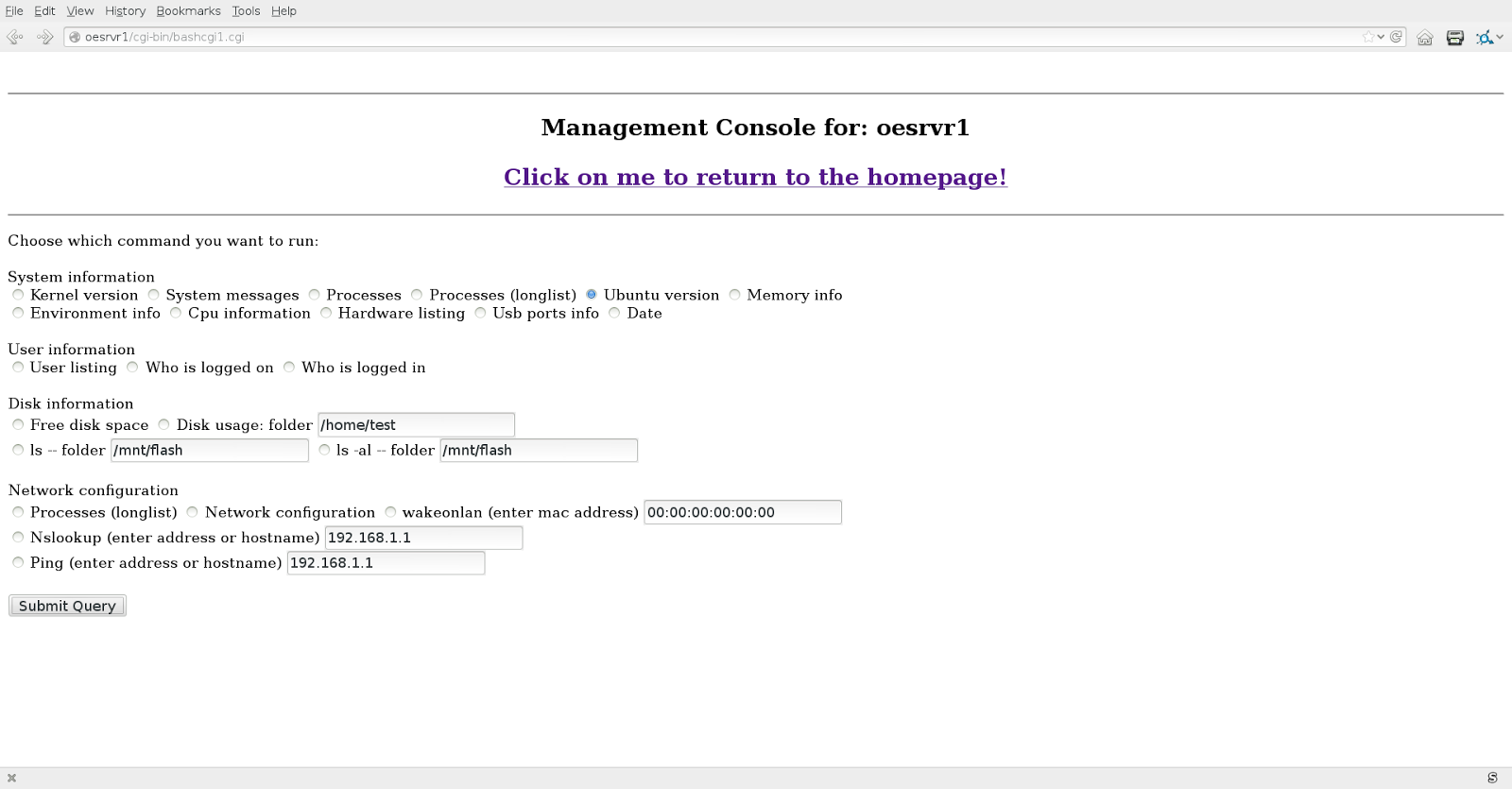
Wanted to have a no frills way to show what basic linux commands do without using or going to the command line. Slowly but surely the program is becoming more and more of a linux server monitoring tool. This is not the latest version, but you get the idea. This project is becoming more and more popular.  Could easly be adapted for the bsd based Fruit operating. Sure it could be modified for the Microsoft based operating systems, but I will let someone else do that. Also sort of became a management tool for non linux professionals. for example you can get the amount of disk space available with a touch of two buttons. Letting management know when to budget for a larger hard drive. You may just want to know what version of the operating system you are running. Time to upgrade yet? Of course these menus are hidden from the public with only permissions for the appropriate personnel. To get more information about using this type of script see:  http://www.instruc...

Monitoring linux servers for beginners.

Image
Wanted to have a no frills way to show what basic linux commands do without using or going to the command line. Slowly but surely the program is becoming more and more of a linux server monitoring tool. This is not the latest version, but you get the idea. This project is becoming more and more popular.  Could easly be adapted for the bsd based Fruit operating. Sure it could be modified for the Microsoft based operating systems, but I will let someone else do that. Also sort of became a management tool for non linux professionals. for example you can get the amount of disk space available with a touch of two buttons. Letting management know when to budget for a larger hard drive. You may just want to know what version of the operating system you are running. Time to upgrade yet? Of course these menus are hidden from the public with only permissions for the appropriate personnel. To get more information about using this type of script see:  ...

Listen up industry,

Was not so long ago that when you bought a piece of software, you had to agree to the license, The license was sealed in the package the software came in. To furthermore complicate the sale, written on the outside of the package had a notice that if you opened the package it was not returnable. These were known as shrink wrap agreements. The public who thought this was unreasonable quit purchasing software. The industry claimed it was because people were illegally copying the software. Though that might have been partially true. The real reason for the sales slump was that you could get what was known as freeware that in a lot of cases was as good as the commercial products. Freeware did not have shrinkwrap agreements. The public took the industry to court and had the shrinkwrap agreements invalidated and even made illegal in a way. At the same time, software known as word processors (aka electronic typewriters) were very popular software. The only problem was that if you created a doc...

What's reasonable?

Image
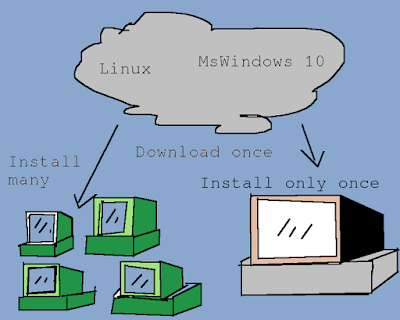
Was watching The Today Show and they had a segment where Microsoft was going to help out some schools and their computer educational programs with a free gifts of MSWindows 8. With articles like http://www.zdnet.com/mit-professor-windows-8-is-a-Christmas-gift-for-someone-you-hate-7000008479/ makes me wonder what MSFT is really up to. After a year, the school systems will probably have to start paying for licensing (also known as the Microsoft tax). So the MSWindows 8 will put the school systems possibly even in a worse situation.  To add insult to injury, if the school system can not pay for software, they probably have not updated their equipment recently. So to run the so-called free MSWindows 8, the school system already stretched for money will have to spend a whole lot of money to upgrade their computer equipment just to install and run MSWindows 8.  So how is that a bargain? Enter open source....  In fact, one such free operating system that predates linux by abo...

Some links to instructables.

Image
Some links to instructables: ( www.instructables.com/member/computothought) Web related: http://www.instructables.com/id/Web-related/ Coathangers: http://www.instructables.com/id/Coathanger-projects/ Data-mining: http://www.instructables.com/id/Data-mining/ Electronic Guides: http://www.instructables.com/id/Electronic-Guides/ M$ http://www.instructables.com/id/Microsoft-themed-instructables/ Linux http://www.instructables.com/id/Linux-themed-instructables/ Antennas: http://www.instructables.com/id/Antennas-TV-Wifi-and-etc/ Food:  http://www.instructables.com/id/Our-food-instructables/

Command line freedom.

Image
More and more computers are going back to the command line. This is being done so that it takes less resources to run that system. It also makes it easier to have what is known as virtual machines all running on one piece of hardware, thereby saving money. That includes Microsoft products such as their server. Yes, they will have a product that runs without MSWindows. Just like the old DOS machines. With Linux, BSD, and etc have been doing this all along. Two invaluable tools are DVTM (a command line window manager and SCREEN (a command line connection or session  detacher/reattach). With SCREEN you can free yourself of that ssh or rlogin session and then reattach to the session later from the same or another computer. For details see: http://www.instructables.com/id/Linux-screen-play/ . With DVTM you can have multiple windows or more than one usable prompt at a time. You could be working on your favorite  spreadsheet doing important reports while watching an...

Microblogging from the command line.

Image
With everything going gui-ish, why would I want to use the command line to micro-blog? Actually there are several reasons. Remember a computer is a robot without legs. First it is a way, remind yourself of certain things even if you are at a terminal where you have no rights to store information on that equipment. Just a matter of keeping twitter site open to receive the tweets if you are using twitter as your micro-blog. With at or chron, you can easily set up your computer to send your specific message or messages at a particular time. Secondly, you have the ability to use a low resource machine to do messaging tasks like capture tweets of other people for you to read later. Sort of a electronic secretary taking tweets like taking phone calls for you. You can even go a step further and do what is call automated web page scraping to get the information you need off the web without you having to go do that yourself. I have several web page scraping batch files that get the weath...

Microblogging from the command line.

Image
With everything going gui-ish, why would I want to use the command line to micro-blog? Actually there are several reasons. Remember a computer is a robot without legs. First it is a way, remind yourself of certain things even if you are at a terminal where you have no rights to store information on that equipment. Just a matter of keeping twitter site open to receive the tweets if you are using twitter as your micro-blog. With at or chron, you can easily set up your computer to send your specific message or messages at a particular time. Secondly, you have the ability to use a low resource machine to do messaging tasks like capture tweets of other people for you to read later. Sort of a electronic secretary taking tweets like taking phone calls for you. You can even go a step further and do what is call automated web page scraping to get the information you need off the web without you having to go do that yourself. I have several web page scraping batch files that get the weath...

Red October network discovery.

The basis of this article is based on the dialog from the movie known as "The hunt for the Red October". In the movie, one of the key lines was I think "One ping and one ping only". Pinging was a method by submarines equipped with sonar to detect what is around them. Normally you would use more than one ping. In computing we also have a program called ping that does the same thing to detect what is around on the network. There is a very powerful program called nmap that usually automates such activity. That usually takes some kind of administrative power to implement. We will be using a simple linux batch file (could be easily converted to other platforms) to detect what is around us. This tool is perfect for the home network. It will probably not detect what is known as "Man in the middle devices", but at least you can see the visible systems on your network. The code. ping.sh: (do not forget "chmod +x ping.sh) [code] for i in {1..254} do pin...

Your first web program.

Image
Wanted a no fee and a bit more basic introduction to web programming, So I deleted the previous article.   Hopefully this one is free all the way through. If you are using linux, you can certainly use, gedit, nano, or vim to create a file for the video. They default to the ascii format automatically. These videos use the old style html programming, but it is still a good start. The intro video: Second video: Later.

Did someone get a clue?

Image
There are two basic types of computer set ups. First is a workstation (touch pad, laptop, or desktop) that you or I might use. Then there is the server that does just that. it serves out software (programs) and data (aka your files). Generally there is no sitting at the server using it as you would your workstation. They should be pretty much standalone units. Whether you use a workstation or a server, you still have be able to manage those systems. Traditionally in the Microsoft World the servers were gui (graphical user interface) or mouse oriented. Sounds easy that you can manage even hundreds of machines with a click. Unfortunately, that was time consuming and got old quick. I know as I did that for a living for many many years. There had to be a better way. Also when we consider a gui, that takes more instructions for the computer to have to deal with and therefore more memory or ram (random access memory). So for a server to deal with these extra instructions will not only sl...