Posts

Showing posts with the label CPU

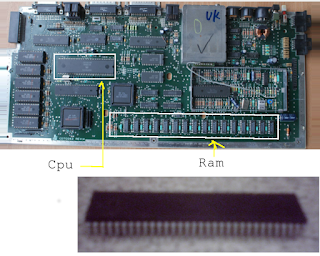
Tech school grad fails simple test.
Image
So many years ago I worked in a small family owned computer store. At one time we needed a second repair tech whose primary job would be to repair and upgrade equipment. One particular tech came from a highly advertised tech schools,who was  highly recommended and was suppose to be the cream of the crop. Our existing tech wanted to hire the individual. So he gave the prospective employee an easy test. The potential employee was asked to point out a ram chip. The potential employee picked out the Motorola cpu as the ram chip. Obviously that was the wrong answer. Our existing tech thanked the potential employee and sent him on his way without a job. Unfortunately, later all the employees had a big laugh over the incident. Even if you are not familiar with that motherboard, usually the biggest chip is the cpu or other control chip of which there is usually only one.. Generally ram chips are in multiple banks of eight or nine. Also too, the prevalent chip number at the time wa...

linux CPU info.

Image
  CPU hardware information The cpu information includes details about the processor, like the architecture, vendor name, model, number of cores, speed of each core etc. There are quite a few commands on linux to get those details about the cpu hardware, and here is a brief about some of the commands. 1. /proc/cpuinfo The /proc/cpuinfo file contains details about individual cpu cores. Output its contents with less or cat. $ less /proc/cpuinfo processor : 0 vendor_id : GenuineIntel cpu family : 6 model : 23 model name : Intel(R) Core(TM)2 Quad CPU Q8400 @ 2.66GHz stepping : 10 microcode : 0xa07 cpu MHz : 1998.000 cache size : 2048 KB physical id : 0 siblings : 4 core id : 0 cpu cores : 4 apicid : 0 initial apicid : 0 fpu : yes fpu_exception : yes cpuid level : 13 wp : yes flags : fpu vme de pse tsc msr pae mce cx8 apic sep mtrr pge ...

The five basic computer parts.

Image
Five basic components of computer system 1.Input Unit 2.Output Unit 3.Storage Unit 4.Central Processing Unit (CPU) 5.Arithmetic and Logic Unit (ALU) 6.Control Unit The internal architectural design of computers differs from one system model to another. However, the basic organization remains the same for all computer systems. The following five units (also called "The functional units") correspond to the five basic operations performed by all computer systems. 1. Input Unit Data and instructions must enter the computer system before any computation can be performed on the supplied data. The input unit that links the external environment with the computer system performs this task. Data and instructions enter input units in forms that depend upon the particular device used. For example, data is entered from a keyboard in a manner similar to typing, and this differs from the way in which data is entered through a mouse, which is another type of input device. How...

Right to bear arms.

Image

Right to bear arms.

Image