Posts

Showing posts with the label router

Connecting.

Image
Couple of definitions first. Some people may disagree with this. Network hub: A network hub is a network device that a single network of the same  media types. but paths are intermingled (obsolete) Network switch: A network switch is a network device that a single network of the same  media types. but paths are separated. Network bridge: A network bridge is a network device that connects a single or multiple network segments of different media types. Network router: A network router is a network device that connects multiple network segments of the same media types. Now to get confusing. Many network devices can be a combination of the above. Take for instance what a lot of people call a router is actually a combination of of a bridge and a router. These we all pretty much know about, but what if we wanted to connect some legacy devices such as dumb terminals so they would have virtual access to the network. Actually they are just acting as an ex...

One ipaddress into many.

Image
Ever go somewhere and you need to have several systems be able to access their network, but they say all you can have is one Ipaddress. An Ipaddress is like a phone number for a computer.  You can only have one per system under normal circumstances. Here with an extra system, we will show you how to do this. A multitude of reasons exist as to why one would want to build a custom router vs. suffer with the performance, reliability issues, and limitations of an off-the-shelf solution. In the spirit of keeping this post short, I won’t launch into a long diatribe on the pros and cons of each here, but I have plenty of thoughts on this, so if you are interested, just ask. What we are about to do is configure an incredibly fast and stable router/gateway solution for your home/office in about 15 minutes. (Note: This post assumes you already have your machine loaded up with a fresh copy of Ubuntu 14.04 or an equivalent and you have the two needed NICs installed.) T his is not a f...

Cnc routing.

Image
CNC is a big thing. You might think of it as the 2d version of a 3d machine. With a 2d machine you remove material and with a 3d machine you add material to get an object. Always have wanted to build one myself. Have the stepper motors, just have to make the rack. Numerical control (NC) is the automation of machine tools that are operated by precisely programmed commands encoded on a storage medium, as opposed to controlled manually via hand wheels or levers, or mechanically automated via cams alone. Most NC today is computer (or computerized) numerical control (CNC) in which computers play an integral part of the control . Nowadays you can get a computer and almost do all of it yourself.  First you have to have a drawing prepared. There are lots of existing artwork you can use or you can create your own .svg files with Inkscape. Scalable Vector Graphics ( SVG ) is an XML-based vector image format for two-dimensional graphics with support for interactivity and animat...

RPi 1 cased

Image
There are a lot of diy cases on the net. Probably the most notable one is the cardboard case.  You can easily find them on the net by looking for RPi printable cases. Be sure and tell the printing program not to resize image for printing. This next two were not real impressive and not so easily put together. Kind of flimsy? This next one seemed a bit complicated. Then there are the .dxf files with Librecad so you can use them a laser cutter or cnc router.

EFF open source router.

Image
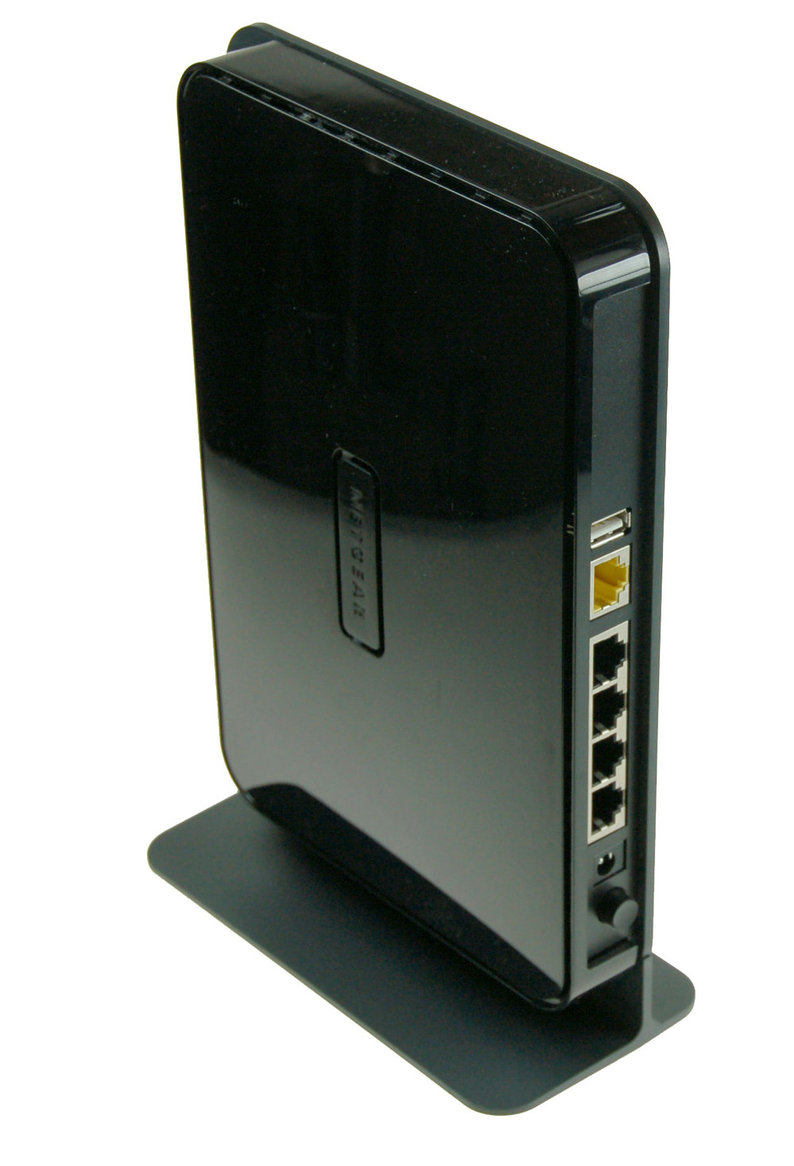
The EFF aka Electronic Frontier Foundation has come out with open firmware (allegedly based on openwrt) for a particular router. The router is the Netgear WNDR3800 router. you can get the firmware at: https://openwireless.org/content/open-wireless-router-firmware-installation But actually if you use an old pc, a host of free router software is already available. Examples:  http://www.instructables.com/id/DIY-network-firewall-from-legacy-parts/ or http://www.instructables.com/id/Openwrt-on-a-pc/

Plug in what where?

Image
Home made router But where do you connect the wires?

Wired then and now.

Image
The more things change, the more they stay the same.

PC as a router.

Image
Openwrt is a very well known firmware for commercial routers. What a lot of people may not know is that it is available for the personal computer environment. In fact, you can find more about it here: http://www.instructables.com/id/Openwrt-on-a-pc/ But now there is an offshoot of Openwrt called Gargoyle ( http://www.gargoyle-router.com/ ). Like Openwrt, they both can run in a virtual machine! So you could run several routers all on one system. That is something so far you can not do on a commercial plastic router. Hopefully, I will be doing an install set up soon. If you can do the openwrt install, then the gargoyle install should be easy. If you go to their download page, you can easily choose the right firmware to download for an X86 system. Linux users will want to have the software dd available to transfer the image to a drive. You do get a gui interface to interact with remotely like most routing software, That way you are not locked into the command line. G...

Where have all the i386 cpu's gone, long time ago...

Image
Years ago there was a song called "Where have all the flowers gone". I sort of wanted to do an introduction based off of that.  In a way the Intel i386 based architecture is not gone, but there is certainly a new major player on the scene. The Arm architecture is the new kid on the block. Originally used for embedded systems, is now coming into the main IT stream. There are desktops, laptops, tablets (aka palmtops), servers and etc that the I386 based systems have done for so long. What is the advantage of the Arm cpu's?  They are cheaper, require less electrical power, and require less space just for starters. The picture represents four different arm or arm derivative based devices that are all within a foot or so of each other. Almost like a whole network of devices.  None of them are the traditional Microsoft operating system based devices either. They are all using some kind of unix lookalike operating system. That is a good thing as it allows similar software t...

Update openwrt PC (x86).

Image
More and more of the plastic routers you get from a retailer are limiting you from installling a third party firmware to make the unit more valuable. So it is nice you can put an old pc back to work and install the same kind of firmware you would put on the store bought routers. Also with the pc you can swap the nic cards for better nics without getting a whole new system. Pulled out of the closet the pc I was using as a router and found that a few things have changed. I just went ahead and installed the latest openwrt kamikaze image on the system. What does the system have? Intel PII 266 mhz with 192 meg ram. The openwrt hard drive is only 2 gig. Thinking about using another case. The system actually has two drives. one with a minimal Debian linux to be able to get the latest image or dd (or install) to the openwrt drive. The Debian linux drive is usally left unconnected. First thing I did was to change the dead motherboard battery.  Second  thing I did was change the passwor...

What's on your network?

Image
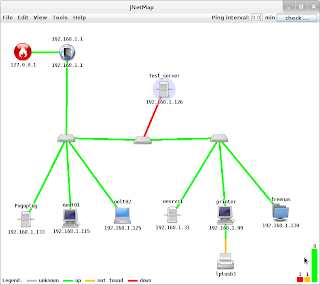
Ever wanted to know what is on your network graphically? There is a program that works on most platforms that support the java gui. Your best chance to document your home network. The program is jNetMap. The java version seems a lot more stable now. You can find it on sourceforge.net You can start up the the program very easily from the command line with (if you have java installed): $ java -jar jNetMap.jar or  C:\> java -jar jNetMap.jar The instructable: http://www.instructables.com/id/Map-your-network-visually/ has more information also. Once you run the software on your network and scan for devices, you can get a roadmap of what is there. What is really neat about it is, you can see what devices are up or down on the network and it makes trouble shooting easier. You can also see rogue devices on the network also that need to be investigated. You can use the mouse to move all the icons around to make the map more readable. You can even add notes to define wher...

Your firewall died and all the stores are closed.

Image
Your router/firewall died and all the stores are closed. What do you do? What do you do?  Time to go to the old parts bin and resurrect some parts. One unique idea about this set up is that instead of using an old fashioned hard drive, we well be using a compact flash card as the drive. For three reasons we do this. First is to cut down on the noise. A quiet pc is an ignored pc. Secondly, we want to cut down on the heat in the machine.  Cooler parts should last longer. And the lastly, to reduce the electricity consumption till you can get a replacement unit if you decide to get one. What is a firewall again. It is a set of hardware and software that insulates your home network from the internet. Just as a firewall is used to keep a fire from spreading, the network firewall is expected to keep your local area network secure to a degree. Nothing is perfect. You can get all kinds of units to protect your network. The network modem in most cases will not protect you. You...

Are you static or dynamic? (phone book part II)

Image
Or should I say is your computer's ipaddress static or dynamic. Static means it is hard coded in the system files on a system. Dynamic means you get the ipaddress for a dhcp (dynamic host configuration protocol)  server or the like and it could change at any time. We said in the last article that all computing devices (assuming they are connected to a network) have an internet telephone number or ipaddress. What I did not discuss was how you get that address. To make things more interesting your router actually has two or more ipaddresses. One is for the internet which is usually dynamic unless you have paid for a static ipaddress through your internet provider and one is for being the gateway (where to point to for accessing the internet) for your local area network is static.  To make things easier, I will only talk about ipaddressing withing a local area network for now. Your local router usually comes with a standard ipaddress for the local network. You can change it, but ...

Your local network telephone book.

Image
We need a way to know what device (i.e. computer) is what and or who. That is why we need an internet telephone book. The internet is in some ways still is like a telephone network. You can key in the phone number of someone to call or you can use the phone book to look up their phone number. The internet is sort of the same, but now the directory assistance is built in so to speak. The internet uses an internet protocol address instead of a phone number, to identify which computer is which, The Google internet protocol address is: 173.194.64.106 in this case. Computer directory assistance: $ nslookup www.google.com Server:        x.x.x.1 Address:    x.x.x.1#xx Non-authoritative answer: www.google.com    canonical name = www.l.google.com. Name:    www.l.google.com Address: 173.194.64.147 Name:    www.l.google.com Address: 173.194.64.105 Name:    www.l.google.com...