Posts

Showing posts with the label PHP

Simple feedback form for a closed network.

Image
Always looking for ways to reduce paper consumption. To me little feedback pages are just the way to do that. Here is one legacy form we like to use.       <code> < html > < title > Offshore Educators (Main Page) </ title > < title > Send us some comments </ title > < body bgcolor =" aquamarine "> < CENTER >< h2 >< B >< I >Offshore Educators</ I ></ B ></ h2 ></ CENTER > < h2 >Your Comments: </ h2 > < p > By filling out this small form you can send us some comments. < p > < hr > <!--- Comment Form --> < form ACTION =" contact.php " method =" post "> Your name:< br > < input name =" name " type =" text " size = 60 > < br > < p > Your email address:< br > < input name =" email "...

It could happen...

Image

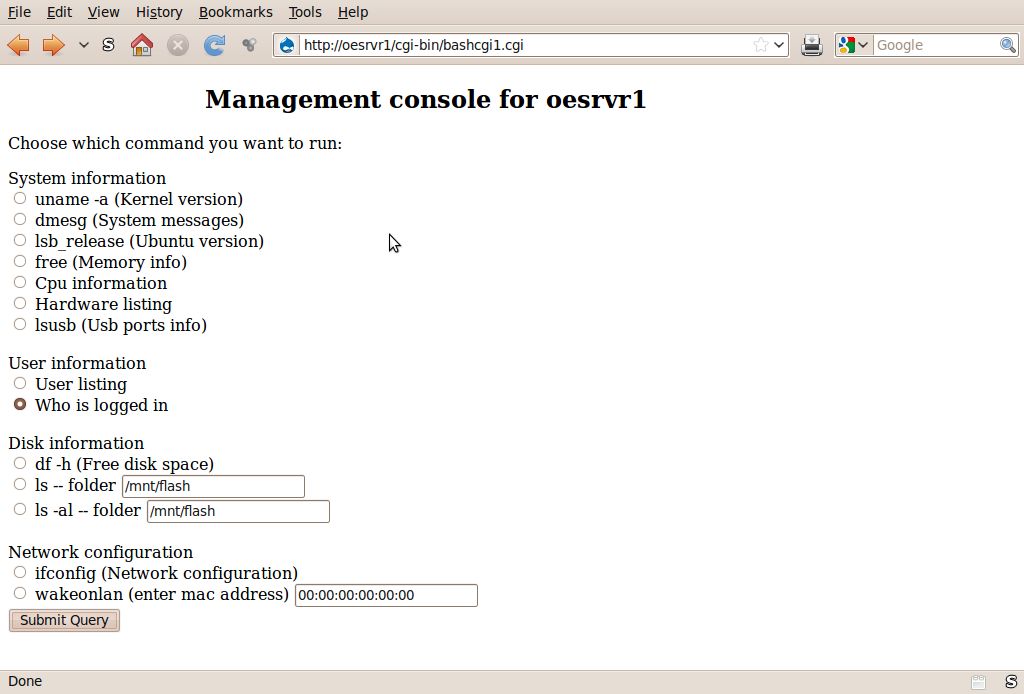
Management console.

Image
Originally I was looking for a script that I could use via the web to manage a machine. Really did not find anything, but after backdooring into a script from searching the www.archive.org, this is what I came up with. The original code was only about ten lines or so, but what a script. You can find the details at: http://www.instructables.com/id/Simple-linux-commands-from-a-web-page

Data mining.(updated).

Image
Ever wished you could get data from a web page without reading the whole web page, or for even just getting data from a server.   One thing I like to do is get the football scores. Find that SI.com and some other sites have so much going on it takes forever to navigate the pages. Not only that, you are subjected to all the ads. Just give me the scores so I can move on. Data mining allows me to do that.  In other words, the computer can be your personal secretary to get all the data you need for your special reports. without you having to do all that hard work and the extra time to be spent. Written a series of beginner guides for data mining. You can find them at. http://www.instructables.com/id/Data-mining/ Note:  The football score capturing script works best for the preceding week or earlier in the same season. Update: Let's take what we have learned already and apply it. Showed you how to extract data to make your own web page and also showed y...

Web server up?

Image
One of the things I get dismayed with is when going to the bookmarks and a link is dead. Also too, If I have several web servers I like to access, it would be nice to know if the site is up before I try to go to that site. Here we will use a small amount of PHP (another web language) that can be used with HTML just like javascript. Generally PHP is used only on servers, but you can run a local copy of it. PHP is available for most systems. Bookmarks really do not carry that much information per se. The above example only has one entry for sake of simplicity. What I would really like to know is if that site is still good, that is up and running. So I added an extra column for the server status. Again just one entry for sake of simplicity. Now before I even go to the site I can tell whether it is available. In the real world, you will probably will have many entries and many servers. For example, one page I use lists several servers, but some  sites are virtual so they...