Posts

Showing posts with the label server

Gui Web

Image
Tim Berners-Lee was the real inventor of the gui (www) internet. NOT I REPEAT NOT Al Gore. Source code: ------------------------------------------------------ Cern web server  Browser advanced Browser original?

Legacy computer home automation server

Image
Using legacy systems to do home automation when an Arduino or Raspberry Pi may not be available. They can work just as well.  Server is a Pentium III with Ubuntu and Apache2. Enabled CGI (common gateway interface). Wrote all my own scripts using html, bash, and compiled freebasic (controls the leds).    Leds are connected to the parallel port via a home made adapter cable. Most of the code and interfaces are described in previous articles.  Added the video to the home web page: Time to control real world object such as a coffeemaker. For more information: http://www.tldp.org/HOWTO/text/Coffee

Traveling chef.

Image
When I first made the following cartoon it was pretty much tongue in cheek. But really when you think about it, it is a blessing in disguise. What if you could localize a lot of the web you use a lot without having to use any bandwidth. Actually we already do it with our local web server now that I think about it. If you were a traveling chef you could go choose a food menu. and from that menu, you could do several things. Such as use several calculators. Such a a food conversion chart. Or even have your recipe book with you. And the neatest of all things you could have a virtual site from the same server to show your clients what they could have for dinner. Is that not all awesome! All from that little server without having to go to the internet.

Simple web server management script.

Image
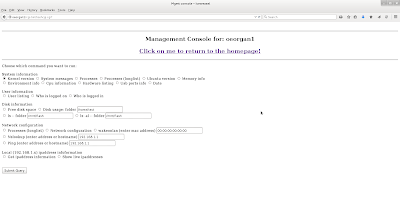
Not so long ago while  searching the web for certain cgi scripts found ths very short script in the wayback machine. Apparently the author no longer had the page, The script was twenty lines if that. The script did not seem like that much at first, but then I started adding code. You could even add other scripts to allow itself to be more powerful. The script became more and more useful. Did not fancy it up with advanced html, but it was so useful, put it on all the major servers.  An older version of the web page looks something like this: One of the features I integrated into script was to see what ipaddresses were live on the network. That may not mean so much but if you are on a tablet, that is not and easy thing to do usually. That way you could see if there were any trespassers so to speak. Pretty much know what the usual ip addresses are. If one was missing that meant a device was either down or not connected  A cute feature. If you want to experiment ...

Install once, use many.

Image
With the internet you can access so many applications say a cooking program to help you prepare meals. The network configuration is pretty simple. It might look something like this: But then you can actually set up your own home web server and the network might look something like this. I have separated the web paths from the internet and the local web server  to make things a little clearer. Now that means you could have even more interesting web applications such as a web desktop. Some with a tablet could still generate documents without having any special applications on the tablet. You even set up many other applications without having to use the web. ( http://www.instructables.com/id/Uses-for-your-own-private-cloud/ ) So now you have double the pleasure. But what if your internet was cut off or you needed to limit your bandwidth. The the network might look something like this, but you would still have access to your local server. This is sometimes kno...

Server upgrades.

Image
Upgrading the operating system on your home machine is a piece of cake compared to doing it in the server environment, Generally when you care changing a server os, you use a new systems so that if there are issues you can go back to the old system as a failsafe. There are always issues setup up new operating systems especially with hardware drivers, so dealing with that can be fun. When you set up a new system the storage formats are completely different.   Some applications will balk at that, In some cases it could be just a permissions problem. Also network printers and input devices have to be set up. Remembering once when we went from Novell to NT printing out student invoices did not work or barely worked. The consulting company said it worked when they tested it, but never really did a mass testing. We ended up pooling printers to make things work well enough till a better fix was done. To add to that scenario, you have to make sure the general permissions of fi...

Check a server status.

Image
(Updated with correct code. copied wrong code!) Ever wanted to quickly whether a web server is up without going to the web page. Here is a quickie static cgi-bin script to do that. You can even check not only on local servers but most any web server on the net. The lines that do not have an ip address are virtual hosts from the last mentioned IP address. You will need to refresh the page to get the latest status. The code is written in PHP, so PHP will need to be installed as well as the cgi-bin directory enabled. Most lamp servers have this already setup. There are probably better scripts but this one was quick and dirty. )corrected) [code]  <html> <body> <hr> <center> <h2> Web Server status </h2> </center> <hr> <br /> <table border="1" cellpadding="10"> <tr> <td> Ipaddress </td> <td> Site (and link) </td> <td> Description </td> ...

Chmod me.

Image
Admin hint of the day: Understanding permissions on linux at first can be unsettling. There are several applications that you can access on-line to make it easier. If you have your own server, you can setup the application there and not be dependent on the net. For more information see: http://catcode.com/teachmod/

Server Selfie.

Image
My old server can do a lot of things s evidenced by http://www.instructables.com/id/Uses-for-your-own-private-cloud/ In fact a few of the virtual sites are: Makes me so proud the server can do so many things. So here is a server selfie.

Clone me.

Image
You just bought a new computer and the first thing you want to do is to turn it on and play with it. DON'T. You will want to make a pristine duplicate of your computer's hard drive first. Why? Because that way you can be sure that you can go back to the beginning if you need to. In fact, I recommend getting two extra drives unless you have a server with plenty of space. Why two drives?  The first drive will be a duplicate of the virgin hard drive. The second drive will be a duplicate of the modified and  setup system you can use as a base in case you have problems.  After setting up thousands of systems in the corporate environment, the words come from experience. You will also need software to back up your drives without it having to be installed. You will have to do some research as they change all the time. The two I have used most is Clonezilla and Ghost. Clonezilla is free for personal use. Best to read the manual before using the software. Eve...

The arduino web server.

Image
      Minimal to use the Arduino as a web server and that is already in a sketch that you can use. You need to edit the code so it will work in your network.   [code] #include <SPI.h> #include <Ethernet.h> /******************** ETHERNET SETTINGS ********************/ byte mac[] = { 0x90, 0xA2, 0xDA, 0x0D, 0x85, 0xD9 }; //physical mac address byte ip[] = { 192, 168, 0, 112 }; // ip in lan byte subnet[] = { 255, 255, 255, 0 }; //subnet mask byte gateway[] = { 192, 168, 0, 1 }; // default gateway EthernetServer server(80); //server port void setup() { Ethernet.begin(mac,ip,gateway,subnet); // initialize Ethernet device server.begin(); // start to listen for clients pinMode(8, INPUT); // input pin for switch } void loop() { EthernetClient client = server.available(); // look for the client /* a place for the code*/ dela...

Just a new package.

Image

Remote computer radio.

Image
 Set up your own computer based radio. radio - locator .com is a good place to start for looking to find available stations. Many radio stations will let you listen to their live stream, Sometimes you can find and use the link on their web page. Sometimes you have to venture through web page html to find it the file and download it from their server. So if that file gets updated, you will need to get the file again. A play list might look like: $ cat klolfmaac.pls [playlist] File1=http://2243.live.streamtheworld.com:80/KLOLFMAAC_SC File2=http://2243.live.streamtheworld.com:3690/KLOLFMAAC_SC File3=http://2243.live.streamtheworld.com:443/KLOLFMAAC_SC Title1=KLOLFMAAC_SC Title2=KLOLFMAAC_SC-Bak Length1=-1 NumberOfEntries=3 Version=2 or $ cat koda-fm.m3u http://107.14.43.102:80/7/597/20097/v1/auth.akacast.akamaistream.net/koda-fm http://koda-fm.ng.akacast.akamaistream.net:80/7/597/20097/v1/auth.akacast.akamaistream.net/koda-fm http://koda-fm.ng.akacast...