Posts

Showing posts with the label admin

Hunt for Red October

Image
The basis of this Instructable is based on the dialog from the movie known as "The hunt for the Red October". In the movie, one of the key lines was I think "One ping and one ping only". Pinging was a method by submarines equipped with sonar to detect what is around them. Normally you would use more than one ping. In computing we also have a program called ping that does the same thing to detect what is around on the network. There is a very powerful program called nmap that usually automates such activity. That usually takes some kind of administrative power to implement. We will be using a simple linux batch file (could be easily converted to other platforms) to detect what is around us. This tool is perfect for the home network. It will probably not detect what is known as "Man in the middle devices", but at least you can see the visible systems on your ne...

Open for business?

Image
This is two scripts one to find and record machines on the system at the time and the second script is to find open ports on those systems below 1024. alive.sh [code] #!/bin/bash rm /tmp/goodips is_alive_ping() {   ping -c 1 $1 > /dev/null   [ $? -eq 0 ] && echo $i >> /tmp/goodips } for i in 192.168.1.{1..255} do is_alive_ping $i & disown done [/code] /tmp/goodips 192.168.1.1 192.168.1.2 192.168.1.3 192.168.1.4 Now the second script. scannet.sh [code] datafile="/tmp/goodips" a=1 m="not done" while read line do fdata[$a]=$line echo echo $line        let a=a+1        for p in {1..1023};        do        (echo >/dev/tcp/$line/$p) >/dev/null 2>&1 && echo "$p open"        done done < $datafile [/code] results: 192.168.1.1 23 open 53 open ...

Update/upgrade now!

Image
Please keep your systems up to date!    For linux depending on the distro: $ sudo apt-get update; sud apt-get upgrade $ sudo yum update; sudo yum, upgrade $ sudo pacman -Syu etc etc

What's on the network?

Image
Our goal here to see what is live on the network and how possibly vulnerable those machines are. Might be interesting to use with a wifi network. First lets get the live systems at the moment. You will need to change your code depending on your network, alive.sh [code]  #!/bin/bash rm goodips is_alive_ping() {   ping -c 1 $1 > /dev/null   [ $? -eq 0 ] && echo $i >> goodips } for i in 192.168.1.{1..255} do is_alive_ping $i & disown done [/code] Generated goodips file: 192.168.1.1 192.168.1.32 192.168.1.99 192.168.1.126 Then we can run a sort of network scanner. scannet.sh [code] datafile="goodips" a=1 m="not done" while read line do fdata[$a]=$line echo $line         let a=a+1        for p in {1..1023};        do        (echo >/dev/tcp/$line/$p) >/dev/null 2>&1 && e...

Network printer install

Image
Setting a network printer is easy as setting up most any other printer. You need to know about the printer location make and model. You will also need some administrative rights to install the printer. In this case, we will be using the Cups web based utility to accomplish adding the printer. First, if you do not already have access, you need access. $ sudo adduser $USER lpadmin Adding user `eddie' to group `lpadmin' ... Adding user eddie to group lpadmin Done. Note: for more command line goodies, see http://www.cups.org/documentation.php/options.html Note if you do not get the cups page in the browseryou will need to install it. $ sudo apt-get install cups Whew, that is all the command line you need to do. Now you need to open your web browser to "localhost:631". Localhost is just a generic name so you do not have to use your real ipaddress.  When you first go to Cups, you will be asked some rudimentary  questions about your setup. Then you need t...

Happy sys admin day.

Image

System administrator day.

Image
Friday July 26, 2013 is system administrators day. Yes, take care of present and former (if you want to find out if there are any backdoors) system administrators.

What's on your network?

Image
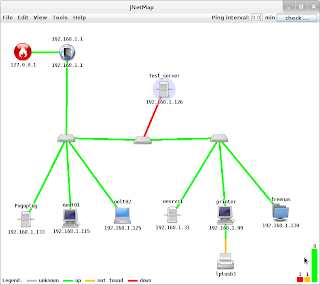
Ever wanted to know what is on your network graphically? There is a program that works on most platforms that support the java gui. Your best chance to document your home network. The program is jNetMap. The java version seems a lot more stable now. You can find it on sourceforge.net You can start up the the program very easily from the command line with (if you have java installed): $ java -jar jNetMap.jar or  C:\> java -jar jNetMap.jar The instructable: http://www.instructables.com/id/Map-your-network-visually/ has more information also. Once you run the software on your network and scan for devices, you can get a roadmap of what is there. What is really neat about it is, you can see what devices are up or down on the network and it makes trouble shooting easier. You can also see rogue devices on the network also that need to be investigated. You can use the mouse to move all the icons around to make the map more readable. You can even add notes to define wher...

Network Tap (not a "Spinal Tap" sequel)

Image
One of the issues I talked about in an earlier article ( http://www.meetdageeks.com/2012/05/is-your-network-firewall-backdoor-open.html ) was about making sure the network infrastructure was secure, That is all the cabling and networking equipment was secure. Look at the following picture and tell me if it is secure. Actually there is a passive network tap inside with a cable going off to a computer in another room. At that other computer someone is eavesdropping or what is known at packet sniffing. The network taps make it easy to record from what you type on the keyboard to recording voip conversations. They require no power and can be made dirt cheap. The only shortcoming is that you have to be nearby to take advantage of it. It would be very easy if someone rented or had access to the office next door to use this device. They might have to punch a hole in the wall to access it unless there is some kind of socket nearby. To record what is coming from the victims compute...