Posts

Showing posts with the label command

Yet another commnd line weather tool.

Image
Use city name  or zip (some people also say that case insensitive and, if you want to specify the nation, you can append an underscore and the nation's iso 2 or 3 letters code or the full nation name, it seems. I.e.: curl http://wittr.in/Milano_usa curl http://wittr.in/Milano_it curl http// wittr.in/Milano_italy ) $ curl http://wttr.in/austin $ curl http://wttr.in/77337 --------------------------------- Script in progress: Get your ipaddress:   $ dig +short myip.opendns.com @resolver1.opendns.com   23.43.247.204   Get location from ipadress: $ curl ipinfo.io/23.43.247.204 { "ip": "23.43.247.204", "hostname": "a23-43-247-204.deploy.static.akamaitechnologies.com", "city": "Cambridge", "region": "Massachusetts", "country": "US", "loc": "42.3626,-71.0843", "org": "AS4436 nLayer Communications, Inc.", ...

Commmand line pluses.

Image
Open source and the command line is a match made in heaven. The command line allows porting of age old rock solid code to nix. Most command line programs survive in the fact they can do one thing well and be used to pipe data from one form to another all without the fancy gui environment. Text based programs port very well. Of gui front ends can always be added later. For example an old spreadsheet program originally written many years ago for cpm using mbasic still lives with the ability for free basic to recompile (with changes) the code.The following flatfile database originally developed in the DOS environment  is being expanded to have the abilities for a relational database.   Lastly there is a text editor developed in the TRS-80 days that can still be easily used in the command line environment when compiled with freebasic. Programs like dosbox can make the conversion easier.     A bit rusty with it but: Native linux version: ...

The desktop environment.

Image
Most computers started with a command line interface. Then eventually migrated to a pictured interface Every computer now has some kind of desktop environment that allows to to interact with the system. The first gui (graphical user interface.) first came from Xerox.  Not going to show every desktop, but I will show the ones I think important. Then came the copy cats such as apple with the Mac and Microsoft with windows. You had to use their gui environment. Linux did not lock you into the desktop, but their were two major variations that sort of stems from the original environments. Gnome was a sort of gui that was like the apple interface and then there was kde which stemed from the mswindows interface. Then things soft of changed. Developers thought that a tiled interface would be easier I call them the Fisher-Price interfaces. Not fond of the tiled environment as you seem to lose some control over the desktop.  To each his own. There...

Command line search.

Image
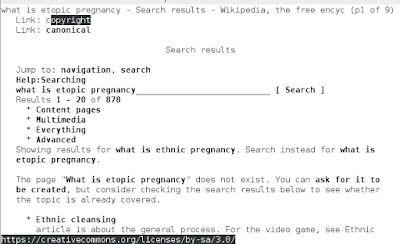
  ______ _ _ ______ _______ ______ _______ _ _ _ / _____)(_) (_)(_____ \ (_______)(_____ \ (_______)(_)(_)(_) ( (____ _ _ _____) ) _____ _____) ) _______ _ _ _ \____ \ | | | || __ / | ___) | __ / | ___ || || || | _____) )| |___| || | \ \ | | | | \ \ | | | || || || | (______/ \_____/ |_| |_||_| |_| |_||_| |_| \_____/ Surfraw - Shell Users' Revolutionary Front Rage Against the Web Have done a lot of web page scraping, but never was aware of a tool called surfraw. What surfraw does is takes your browser with a command line argument of your search criteria and retreives everything via the command line. You do not have to load the browser, go to the search engine and enter in the search criteria. Saves a lot of keystrokes and the results can be easily manipulated. For example say you wanted to know in wikipedia about pregnancy. $ surfraw wikipedia what is ...

Command line spreadsheet.

Image
No matter what system you use or even if you do everything by hand, you will need a typewriter (editor), Filing cabinet (database), and an financial worksheet (spreadsheet). Everyone knows about vim, nano, and  for using as editor or word processor. If you have ever wanted to set up a filing cabinet or database, you probably have heard of Mysql (or one of the variants), Postgresql, or even Nosql. What many people have not heard of is a spreadsheet for the command line.One interesting spreadsheet is called simply enough called sc. Some people may lead you to believe it will only support just numbers that is not true. You can even get a help file with: $ scqref > sc_commands ... ...  A:   This overview  B:   Toggle Options  C:   Set Options  D:   Cursor movement commands  E:   Cell entry and editing commands  F:   Line Editing  G:   File comm...

Command line goodies

There are actually some really good programs for the non-gui environment.Some programs can be used in multiple areas too' User applications Links2, lynx, elinks – internet Bashpodder – audio podcast collector Alpine – email client Irssi – inter relay chat Centerim – instant messaging client Oleo or Sc – spreadsheet Vim, emacs, nani, joe, or a dozen other programs – word processing Antiword – deals with office based documents Putty – secure accessing tool Screen -multiple seesion tool Ledger – accounting (seems to be based on gnucash) gpm, mc, synaptic, sed, awk, sort, ncurses, bash ,ssh, wget, curl Sqllite, mysql, psql, plus man other – databases Hnb – outliner to organize ideas  freebasic, gcc, python, pgp, pgp-cli, perl and etc programming language tools. Too many to list here – games. (i.e ninvaders) Moc, aplay, mplayer, cmis and may others – music players Espeak or Festival – voice synthesizer. Nget and may others – news readers. Cdrecord – cd buring pr...

Notes to myself.

Using a blog to keep miscellaneous notes is a wonderful idea.  They should be always there. #---------------------------- # original install ls -l /var/log/installer #----------------------------- # uptime uptime #----------------------------- # Quicknote (goes into .bash_history) cat > filename <<EOF #--------------------------------- # Quick append (goes into .bash_history) cat >> filename <<EOF #-------------------------------- #Gif to avi convert test.gif old%02d.jpg ffmpeg -r 25 -i old%02d.jpg -y -an new.avi #--------------------------------- # Strip music mplayer -ao pcm:fast:file=batmanpiano.mp3 -vo null -vc null Batmanpiano.flv #---------------------------------- # get screen size $ fullscreen=$(xwininfo -root | grep 'geometry' | awk '{print $2;}') $ echo $fullscreen 1280x768+0+0 #---------------------------------- # put picures in frame montage Inputfiles outputfile #---------------------------------- ...

Menu driven.

Image
Whether you prefer a graphical user interface such as: Where all you have to do is just double click a picture is so sexy and seems very easy. Let's consider and alternative where all you have to do is just press a single key to start the program you want: But then you could actually sort of do the same thing with an interface like this: Oh but it is not as sexy some might say. It does exactly the same thing, but without using so many system resources. Not only that but you could get even more choices without having to redo the desktop. So if you pressed 1, you would get: Or if you pressed 2 than you would get: All this was done without any swiping!  Of course that does not prevent you from using your favorite program such as a spreadsheet or whatever: But then you could do sort of the same thing with a text based alternative like homecalc or sc: With all the embedded devices such as the Raspberry Pi and the like, you will want to be as r...

Backup monitor?

Image
If you set up your serial port for communications and have a serial terminal (some systems may require a usb adapter), you will never worry about not having a monitor for emergencies. (Connecting in this case to an nslu2 running linux.)   Notes from an earlier article to set up serial communication, Your system may vary. Now to get the Pda working with the unit. The Palm pda will not work as is as a dumb terminal, so I had to install a program on to it from another computer called ptelnet.prc using a usb to serial interface. The Palm has an interface cable that will plug directly into the 9 pin serial port on the back of the computer. HP Journa has a standard rs232 port. $  pilot-xfer -p /dev/ttyUSB0 -i ptelnet.prc That should be easy. First to test the port. Strange the serial port on what is commonly known as com2:. (com1: =ttyS0) $ sudo /sbin/getty -h -L /dev/ttyS1 9600 vt100 & $ sudo chmod 666 /dev/ttyS1 A prompt did not show up on the Palm pda. ...

Weather radar in ascii.

Image
Once in a while I sort of come up with a neat idea. At least it is to me. Just because you have an old system, does not mean you can not teach it new tricks. Done a lot of page scraping to get weather details, but it would be nice to use radar screens from the command line. So details in this case are not so necessary. The overall view of the weather to see what kinds of weather fronts are approaching is. Here we go. We need to collect some historical data (i.e. radar screens). You can get these from the radar.weather.gov using the 3 letter designation for the area you are interested in. For example, I believe the Dallas Fort Worth area is supposed to be FWS. You do not have to collect data just for your area. Collect data for several areas and get an overview of the weather all around. (http://www.leonardsguide.com/us-airport-codes.shtml) You need to collect data. Cron is the perfect tool for the job. We need to create a batch file that will collect the pictures usin...

Command line freedom.

Image
More and more computers are going back to the command line. This is being done so that it takes less resources to run that system. It also makes it easier to have what is known as virtual machines all running on one piece of hardware, thereby saving money. That includes Microsoft products such as their server. Yes, they will have a product that runs without MSWindows. Just like the old DOS machines. With Linux, BSD, and etc have been doing this all along. Two invaluable tools are DVTM (a command line window manager and SCREEN (a command line connection or session  detacher/reattach). With SCREEN you can free yourself of that ssh or rlogin session and then reattach to the session later from the same or another computer. For details see: http://www.instructables.com/id/Linux-screen-play/ . With DVTM you can have multiple windows or more than one usable prompt at a time. You could be working on your favorite  spreadsheet doing important reports while watching an...

Linux tricks and tips.

Image
Just a few of my instructables about linux that might interest you in one way or another. http://www.instructables.com/id/Linux-themed-instructables/

Rebuilt a new(old) computer.

Image
As a tech, not so long ago when installing MSWindows on users computers at a former job, people were dismayed at the fact of having to use a mouse via a gui (graphical user interface) with wysiwyg (what you see is what you get pronounced wizzywig). They protested they preferred the keyboard only environment. They exclaimed the keyboard environment was more efficient and exacting. In fact, we who were installing the new environment were verbally accosted for the change over. Now if you suggest using a system that does not have a gui, you go through the same negative feedback. Decided to do a new kind of roughing it by building a system that was technically obsolete using a non-gui environment, but the operating system was up to date. Yep, that means everything has to be done through the keyboard.  Makes me think of the "Star Trek" movie where the Scotty character was using an old Apple Macintosh computer and could not get it to work. He was trying to talk to the mouse. He w...