Posts

Showing posts with the label home

Legacy computer home automation server

Image
Using legacy systems to do home automation when an Arduino or Raspberry Pi may not be available. They can work just as well.  Server is a Pentium III with Ubuntu and Apache2. Enabled CGI (common gateway interface). Wrote all my own scripts using html, bash, and compiled freebasic (controls the leds).    Leds are connected to the parallel port via a home made adapter cable. Most of the code and interfaces are described in previous articles.  Added the video to the home web page: Time to control real world object such as a coffeemaker. For more information: http://www.tldp.org/HOWTO/text/Coffee

Baby steps to home automation, part 3a

Image
Under construction. Controls      Standalone time-based controllers Optional telephone interface for status and control You will neeed a moded (modulator/demodulator) Remote infrared, wifi  or simple wireless (RF) controllers Optional telephone interface for status and control Local network:         Local PC only         Local PC w/Internet access enabled

Baby steps to home automation, part 2

Image
When it comes to home automation, you could use any number of systems such as a off the shelf turnkey solution such as Insteon.Check with your hardware store for more details. You could build it yourself. Unless you are experienced at it, I would let a professional do it, if for no other reason of safety to yourself and others.  If you do do it yourself, you will have to write the software to make it all happen. Though most of it may not be that hard, it can be daunting to the inexperienced. Again get a professional and a mentor. Also any drawings in this article are oversimplified and not to be used in actual systems.  What to do first? You want to make a plan of what you want to do including any budget considerations. (What is it going to cost?) Home Automation – Requirements Checklist Functional Areas:     Controls         Standalone time-based controllers         Re...

Baby steps to home automation, part 1,

Image
There are many parts to home automation but the main need is to be able to turn something on or off. Without that the rest is meaningless. Let us start with a simple light switch that you can control manually. The off position we will call zero and the on position we will call the one state. Of course the purpose of home automation is for you not to have to manually turn off or on a switch. So we can get an electronic part known as a switching transistor to do the job for us with the help of a computing device that we can program. These diagrams are way over simplified to make things simpler. We could ask the computer to turn off all the leds with a command like out 888,0 and if any leds were on, they would immediately turn off. The again, we could issue a command to turn them all on with out 888,255 Then you would want to turn them off and on individually also. Then you would either write some code or have a pre-written program to do it for you and have ...

The arduino light switch.

Image
Here is a web based interface to control some low voltage lines via the Arduino.  The web interface will let you either singly turn an led on of off. You can also turn all the leds on or off at one time. From there you can interface all kinds of equipment.  The basic circuit for the project is: Or to look at an Arduino board the relevant pins are: Whether is is for a Personal computer or one of many microcontrollers, the interfacing technique is pretty much the same. Here are two links to consider: http://www.instructables.com/id/Ubuntu-and-the-arduino/  http://www.instructables.com/id/External-device-control-ie-coffee-machine/ Now you can remotely turn on for off many devices and a start at home automation. The code: [code] #include <Ethernet.h> #include <SPI.h> //network NB: Pins 10, 11, 12 and 13 are reserved for Ethernet module. byte mac[] = { 0xDE, 0xAD, 0xBE, 0xEF, 0xFE, 0xED }; byte ip[] = { 192, 168, 1, 200 }; byt...

Home

Image

Model trains to....

Image
Home computer networks are the new model trains. Here we are using a web application from the home web server in the kitchen. User end device: The server:

Geek food.

Image
Home made pizza or should I say the short life of pizza. Before: During: After:

Uses for your own private cloud.

Image
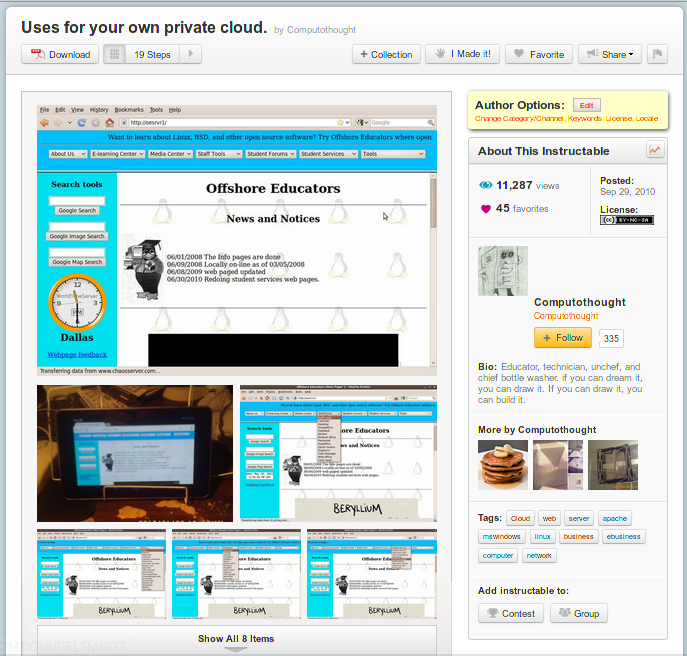
If you have an old machine that is still good shape, but may not run the latest software, considering turning it into a home server. There is so much you can do with it.  In fact, I just installed a personal accounting application on the server the other day. Using that old machine will be the best money you never spent on a system. More information at: http://www.instructables.com/id/Uses-for-your-own-private-cloud/ Just tooling around the server. softserv and oesrvr1 are actually coming from the same machine commonly know as virtual hosts.  Actually have five plus hosts on that system. Then you are taken through a myriad of free open software programs that have been installed available from sourceforge.net and other sites. The latter part of the video displays standalone web applications from web pages that have been extracted and added to the server. Plus a few of my own apps are featured.  Pretty powerful coming from an old Pentium III computer. Not for the rea...

Rasperry Pi security.

Image
(Article from instructables.com with author's permission). Security is becoming more and more important to people. So they are used in protecting property. Actually the are other reasons. Set up security cameras in the testing lab at the school where I use to work to aid in keeping students from cheating. Most people want to be able to use a computer to fill that need without spending zillions of dollars on a special system. We use a Raspberry Pi plus an inexpensive web cam to do just that. There are two major software packages for linux to set up video security and they are Zoneminder and Motion. Like Motion because of the smaller footprint. That makes for better performance on embedded devices such as the Raspberry Pi. . Since the video is internet based, you can watch it from virtually anywhere you can connect to the system. More information on Zoneminder at: http://www.instructables.com/id/Computerized-video-security-setup/ Here is a quickie setup we did for the Raspberry...

Temporary alternative to wireless networking.

Image
There are times when you just need a quick connection at home or in a small office and setting up wireless can be a real hassle not to mention potential security issues. Instead you might consider ethernet over power aka eop. Advantages are that it is all plug and play, you can even use use house wiring as your medium. You will need at least two modules (on for each side of the connection,) i have seen a set of modules for under thirty dollars. That is not much more than the price of a good Nic. Give it a try.

Temporary alternative to wireless networking.

Image
There are times when you just need a quick connection at home or in a small office and setting up wireless can be a real hassle not to mention potential security issues. Instead you might consider ethernet over power aka eop. Advantages are that it is all plug and play, you can even use use house wiring as your medium. You will need at least two modules (on for each side of the connection,) i have seen a set of modules for under thirty dollars. That is not much more than the price of a good Nic. Give it a try.

Oldies but goodies of instructables for XP computers.

Image
Oldies but goodies of instructables for XP computers including home automation: http://www.instructables.com/id/Microsoft-themed-instructables/.

Do your own home automation.

Image
"It ain't dead till we say it's dead." Typical movie quote, but it is a reality that should be a good maxim.  The parallel port printer per say is not used any more, but who says we can not still use the technology in some new way.  Came across this article about using old hp Jet directs as home automation controllers. Supposedly you can get them on ebay for around ten dollars. Though you might have to add ten or twenty dollars in parts, it is still a bargain compared to the hundreds of dollars you have to spend with equipment from a company like Insteon. There are tons of articles where you can get information about using the Jet Directs for home automation.  The one that started it all off was probably from Doktor Andy . Later it was expanded on from this article: Print server power control hack . I am even working on one of my own . Have another article about interfacing the parallel port add-ons. See: External device control (i.e. coffee machine) .